Using Email

Your webmail has 100MB of space. If it’s full, you’ll need to delete items in your webmail.

Please note that e-mails older than 90 days may be deleted in our servers without prior notice.

You can use an e-mail client such as Microsoft Outlook or Apple Mail to expand the capacity and/or keep copies of your e-mails longer.
A full mailbox limits your e-mail from sending or receiving messages.

iPrimus Webmail
Check the gear icon at the lower left corner of your mailbox to know your current mailbox capacity. Delete messages from your inbox and retry sending/receiving.

Permanently delete messages from your inbox

  • Go to Settings on the top right hand corner of your mailbox
  • Select Preferences
  • Click Server settings
  • Under Maintenance, toggle Clear Trash on logout

E-mail client
You may refer to your e-mail client’s support guide on how to delete and manage your inbox. Here are the commonly used e-mail clients and their support pages.

Common reasons for not being able to send/receive e-mails are:

  • Your mailbox is full
  • Your e-mail settings is incorrect

Account Toolbox

To recover your My Account username or reset your password, head here.

  • Select information to retrieve Username or Password
  • Enter your Date of Birth
  • Verify using your e-mail or registered mobile number
Primary E-mail 

To reset your primary e-mail password, log into My Account.

  • Go to Internet
  • Go to Usage Summary
  • Click Change Password

Once you have successfully changed your Primary e-mail password, do not forgot to reboot your modem as it is also the default username and password for your modem.

Secondary E-mail

For secondary e-mail password inquiries, please contact our Technical Support team.

1. Login to webmail here https://webmail.iprimus.com.au/

2. Enter your iPrimus email address and password

3. Navigate to the folder you wish to export emails from

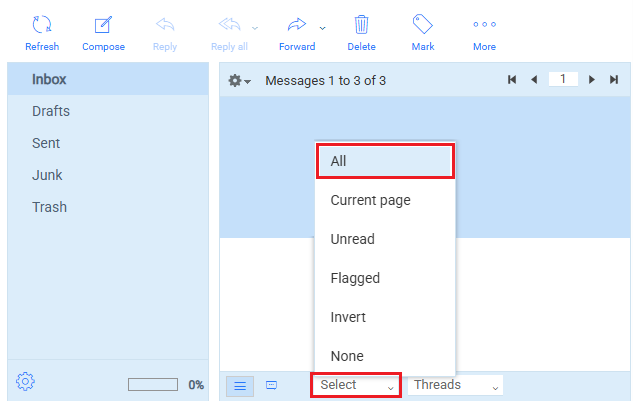
4. Click the Select button at the bottom, and click All

Step 4

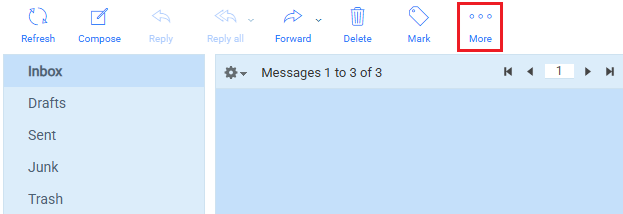
5. Click the More button at the top

Step 5

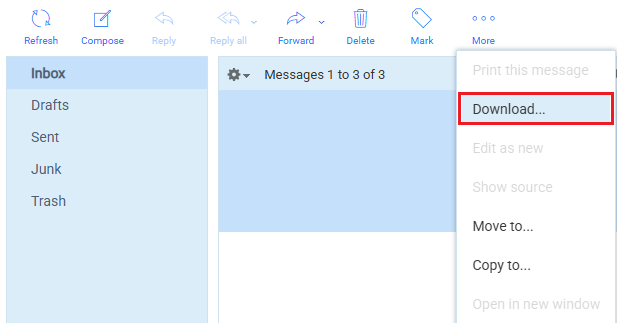
6. Click the Download… button

Step 6

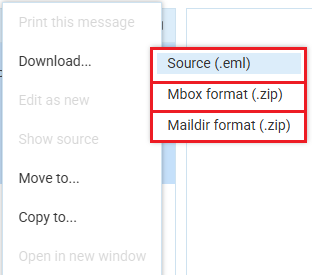
7. Click your preferred format for downloading the emails

Step 7